Rewrite Feature Added to Notepad

Rewrite in Notepad is a new AI-powered feature added by Microsoft for Windows Insiders (in the Canary and Dev Channels on Windows 11.)

Who will enjoy this feature?

It is currently available in preview for Windows Insiders in select regions, including the US, UK, Canada, France, Italy, and Germany. For others, access may require a Microsoft 365 subscription, where usage will count against AI credits.

This tool leverages advanced AI models to help users rephrase sentences, adjust tone, and modify content length according to their preferences.

How it will work:

  • Type the text in Notepad.
  • Highlight the text portion which you like to change.
  • Right-click the selected text and choose the “Rewrite” option, or use the keyboard shortcut Ctrl + I.
  • Notepad will generate three variations of the rewritten text. Choose the one that best fits your needs.
  • To know more:

Use Rewrite in Notepad to Enhance Your Writing with AI

Windows 11 Insider Preview Build 22621.1095 and Build 22623.1095 (KB5022364)

Microsoft has released Windows 11 Insider Preview Build 22621.1095 and Build 22623.1095 (KB5022364) to the Beta Channel.

Changes and Improvements in Build 22621.1095 & 22623.1095
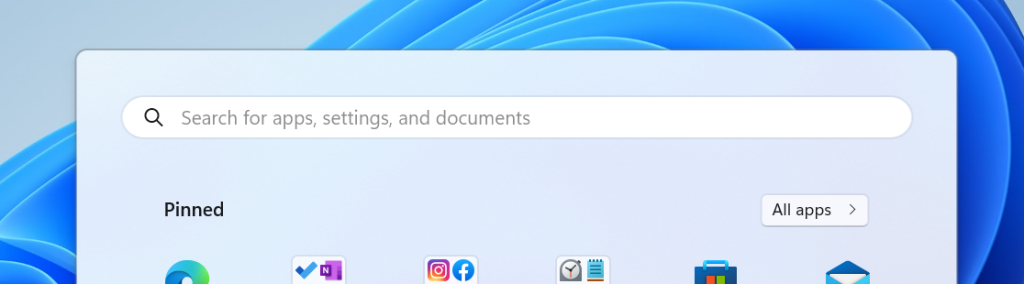
Design of search box on the Start menu has more rounded corners.

  • Search box corner is round.
  • Moved Quick Assist out of Windows Tools so it displays directly in the Start menu’s All apps list and is easier to find.
  • Fixes done in Taskbar, Task Manager, changed the experience for preview .NET Framework updates.

Details here

Windows 11 Build 22621.317 (KB5015885)

Microsoft has released Windows 11 Build 22621.317 (KB5015885) to Insiders in the Release Preview Channel.

This update includes the following improvements:

  • fixed an issue that prevents troubleshooters from opening.
  • fixed an issue that might increase the latency of games when vertical sync (VSync or v-sync) is in use.
  • fixed an issue that affects the ProjectionManager.StartProjectingAsync API and prevents certain locales from connecting to Miracast Sinks.
  • fixed an issue that causes the Smart App Control to block catalog-signed files.
  • fixed an issue that causes the Take a Test app to remove all policies related to lockdown enforcement when you close the app.
  • fixed an issue that might highly distort photos you take using the Camera app. This issue occurs when using certain cameras under certain low light conditions.
  • fixed an issue that throws an exception when you debug drivers using Visual Studio 2022 version 17.2 or later.
  • fixed an issue that causes the Windows profile service to fail sporadically. The failure might occur when signing in. The error message is, “gpsvc service failed to sign in. Access denied”.
  • fixed an issue that prevents virtualized App-V Office applications from opening or causes them to stop responding.

source

Windows 11 Build 22621.169

Microsoft has released  Windows 11 Build 22621.169 (KB5014958) to Insiders in the Release Preview Channel.

This update includes the following improvements:

  •  added Server Message Block (SMB) redirector (RDR) specific public File System Control (FSCTL) code FSCTL_LMR_QUERY_INFO.
  • support for Transport Layer Security (TLS) 1.3 in Windows client and server Lightweight Directory Access Protocol (LDAP) implementations.
  • updated the Remove-Item cmdlet to properly interact with Microsoft OneDrive folders
  • enabled the InternetExplorerModeEnableSavePageAs Group Policy.
  • fixed an issue that causes the Take Photo button to disappear when a user uses a common file dialog to open the camera.
  • fixed an issue that prevents devices from receiving an offer from Windows Update for the same extension driver when that extension driver is already installed without the base driver.
  • fixed an issue that causes install from media (IFM) creation for Active Directory to fail with the error, “2101 JET_errCallbackFailed”.
  • fixed an issue that occurs when the Active Directory Lightweight Directory Service (LDS) resets the password for userProxy objects. The password reset fails with an error such as, “00000005: SvcErr: DSID-03380C23, problem 5003 (WILL_NOT_PERFORM), data 0”.
  • enabled the InternetExplorerModeEnableSavePageAs Group Policy.
  • fixed an issue that occurs when the Active Directory Lightweight Directory Service (AD LDS) resets the password for userProxy objects. When you try to reset someone else’s password and you are authenticated using a simple bind, the password reset fails. The error is like, “00000005: SvcErr: DSID-03380C23, problem 5003 (WILL_NOT_PERFORM), data 0”.
  • fixed an issue that prevents Microsoft Edge from being available in Windows Sandbox.

More here